 / EUR
/ EUR
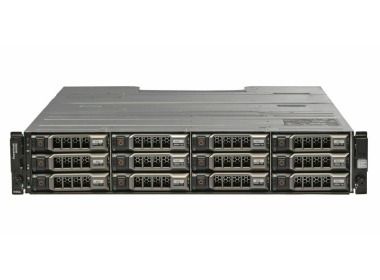
- Storage Array Dell PowerVault MD3200, 2xEMM, 2x PSU DC, Rails1x Dell PowerVault MD3200i 12x3.5" storage array with 2x PSU DC 1x Rail kit 2x SAS cable...Calculating delivery time...In stock 1Warranty 36 months€1,372.34 €1,115.72
- Storage Array Dell PowerVault MD3200, 2xEMM, 2x PSU AC, Rails1x Dell PowerVault MD3200i 12x3.5" storage array 1x Rail kit 2x SAS cable...Calculating delivery time...In stock 1Warranty 36 months€1,093.22 €888.80

FAQ
What is the Dell MD3200i used for, and how does this storage array work?
The Dell PowerVault MD3200i is an iSCSI SAN storage array designed for centralized data storage in small and mid-sized businesses. Servers connect to it over a standard Ethernet network, so costly Fibre Channel infrastructure is not required. It works well as shared storage for virtualization, databases and file servers.
What ports and interface does the MD3200i have?
The MD3200i connects to servers via iSCSI over 1 Gb/s Ethernet, and each controller has several network ports. It usually runs with two controllers, which provides path redundancy. Check the product listing for the exact controller configuration and number of ports on the specific unit.
What drives does the MD3200i support, and can it be expanded?
The MD3200i enclosure holds 3.5" drives (the 2.5" drive version is the MD3220i). Capacity can be increased by adding PowerVault MD1200 series expansion enclosures. Before buying drives, make sure the interface (SAS, NL-SAS), form factor and firmware are compatible with the array.
How does the MD3200i differ from the MD3220i and MD3600i?
The MD3200i and MD3220i belong to the same 1 GbE iSCSI family. They differ in enclosure type: the former takes 3.5" drives, the latter 2.5" drives. The MD3600i is a newer line with faster 10 Gb/s iSCSI. The right choice depends on the bandwidth you need, the type of drives and your existing network infrastructure.
What should I check before buying an MD3200i array?
Verify compatibility with your servers and operating systems (e.g. Windows Server, Linux, VMware), and check whether controllers, power supplies and drives are included. Pay attention to the condition of the hardware (new or used), the warranty, and licenses for additional features such as snapshots. If you have any doubts, consult the store's advisor about your configuration.